8. External dependencies
This section is dedicated to the external workflow dependencies of ecFlow suites (as opposed to software dependencies). This could be other ecFlow suites or external data sources. Suites can depend on tasks being completed in other suites, data becoming available on disk or MARS, and observations. There are ways to check for the availability of data, as well as to trigger specific tasks depending on specific conditions.
8.1. Barrier
The barrier family contains tasks that check if the starting conditions are available so the forecast can start running. When these start conditions are satisfied, these tasks can change their state by setting an event, a trigger, or even an ecFlow state. Some examples of barriers are:
The barrier tasks wait for ECMWF’s NWP forecast output: ensemble, control, seasonal, AIFS (e.g mc, o, eda, seas5, aifs_single suites);
The tasks wait for input from other Centres: DWD, COSMOS, etc. In this case, the event can be triggered by data available on MARS or even on disk;
Observations (BUFR, ODB, radar, etc.), data assimilation, ERA5;
One other use for the barrier is to set it to run on a specific time and/or day (e.g. every Wednesday at 12:00 UTC), which can be useful for specific processes, such as running the lag family a few days after the forecast, or setting the exact date for monthly runs.
There are a number of ways the barrier tasks can be set, and they will be described in the next sections.
8.2. Events
A task in the barrier family can have specific events, such as “no data” or “data ok”, and each will have specific instructions in the manual page:
The event can be set within the task by running “ecflow_client –event data ok” or “ecflow_client –event no data”;
The task can then be configured to fail/complete based on the instructions for each event (e.g. “no data” will be set if MARS is not available, or if the data is not on disk);
An event can be set based on the status of another task, which can be in the same suite or in another suite (e.g. “data ok” will be set if /{control_suite}/main/12/fc/model is complete).
Once an event is set, it will then trigger other tasks to indicate the availability of the data, and the suite can progress or fail. It is also important to note here that events are not limited to the barrier family, and can be set in any task in the suite. More information on events can be found here.
8.3. Triggers and alerts
Triggers and alerts can be used in a number of ways within the barrier family. Depending on the outcome of an event, a trigger will set warning tasks that will check on the progress of the suite. These warning tasks can have a specific time range and will fail/complete to indicate the status of the suite. Some examples of triggers and alerts are:
A “no data” event triggers a “late_alert” task that will fail to indicate to the users the suite is late based on a specific time range;
A second “missing data” task can be triggered at a later time to tell the user there is no data and what are his options;
The users can then check if the data is missing/available on MARS/ECFS/ECPDS/disk, or if the suite can run without that specific data.
The number and kind of alerts and warnings will depend on how the suite runs, performance requirements, and how time-critical the suite is. These triggers and extra tasks are important tools for debugging tasks and monitoring the suite, especially in operations. More information on triggers and alerts can be found here.
8.4. YMD
The year-month-day (YMD) variable is one of the most important parameters in the suite and the barrier family, as it is the reference date for a group family/tasks within the suite. Some aspects of the YMD are:
Can be set as an ecFlow variable that will loop based on the suite’s time range;
The YMD should be set correctly to the first day of the experiment and used consistently throughout the suite, with the right intervals.
Different forecasts will have different intervals (e.g. medium-range, reforecasts, seasonal etc.);
Different parts of the suite can have different YMDs, e.g. lag can be behind main, main behind barrier, etc., meaning these loops run in parallel but wait for their triggering YMD.
Just like events, triggers, and alerts, YMD can also be used in other parts of the suite, such as main and lag.
8.5. Barrier Example
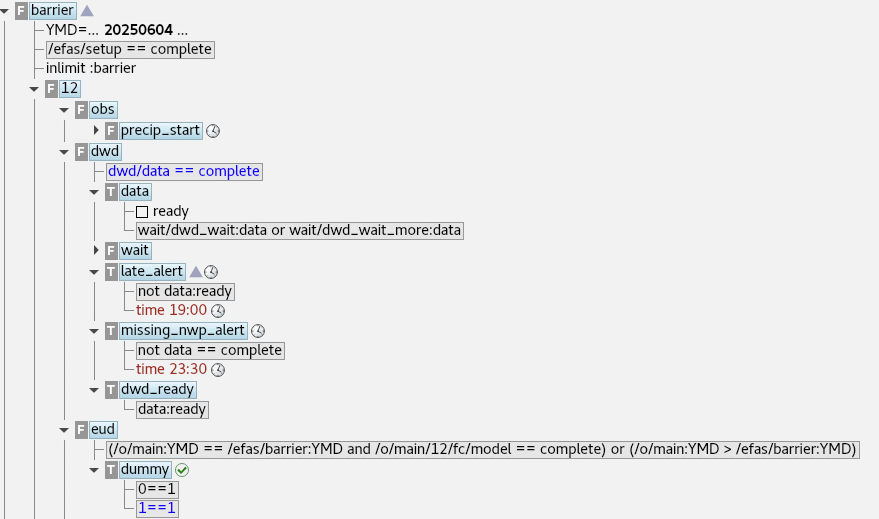
Figure: Example of different families/tasks included within the barrier family.
In the example above, the barrier family has its own YMD variable, which loops over a set of pre-determined dates. This one YMD is used by the other families as a reference, so they can start running to check for other inputs, in this case DWD and ECMWF’s deterministic output. There are also events (e.g. ready) set for specific tasks that will trigger tasks in main/lag.
It is also important to notice how each family has its own triggers (gray boxes under the tasks), where some are based on tasks/events from the same suite, and some will be trigered by external suites, but within the same server.
8.6. Mirrors
Considering all the different elements described above, a mirror is one of the many practices that allow the running/completion of tasks and events in the barrier:
Can be defined as a reflection of the status of one suite on another server;
The idea is that a server can “see” what is happening in another server so the suites in that first serve can progess;
A practical example would be an operational suite that is mirrored to different servers so other suites that rely on it can check their progress;
In this case, the mirrored suites are seen as suspended in the new servers, and their status will be updated based on the original suite;
More information on mirrors can be found here.